Let me clarify few terms here. Docker and Containers are related but distinct technologies. A Container is the core technology that packages your application code along with the necessary dependencies into a single unit. It requires a runtime to operate on a virtual machine or server. Docker is a tool that provides this runtime to run containers, making it easier to build, manage, and deploy them.
Additionally, Docker Swarm is an orchestration tool that helps manage containers across a cluster of servers. It uses a Docker daemon (an agent) running on each node in the cluster to oversee container operations.
Containers needs to follow standard format to ensure interoperability across different container engines. The Open Container Initiative (OCI) sets the standard for container images, ensuring compatibility between tools like Docker, Podman, and others. This standard allows container images to work seamlessly across different platforms and tools.
Container runtime (runc)
Now, let’s dive into the container runtime. runc is a container runtime that complies with the OCI standard. It’s responsible for executing container images that adhere to this specification.
While runc excels at running containers, it only handles the execution part (start or stop) of the container lifecycle. The full lifecycle includes pulling container images, starting, stopping, pausing, and restarting containers. This is where containerd comes in.
containerd: Managing the Full Container Lifecycle
containerd is a more comprehensive container runtime that manages the entire lifecycle of a container. It handles everything from pulling images to running, pausing, stopping, and restarting containers. Internally, containerd uses runc for executing containers but adds functionality for lifecycle management.
Originally, Docker separated its container runtime into the containerd project, which was later donated to the Cloud Native Computing Foundation (CNCF) as an open-source project for further development.
dockerd: Docker agent on each cluster node
Docker works in two modes. Standalone mode, and swarm mode. In standalone mode, dockerd acts a daemon, responsible for doing all docker task on a standalone or single server. In Swarm mode, dockerd also manages the swarm’s state. Swarm mode is essentially Docker’s orchestration feature that manages services, load balancing, scaling, etc., across the cluster.
The dockerd agent in manager nodes manages the overall cluster state, while worker nodes run containers and report back to the manager. Each node in the swarm (manager or worker) runs a dockerd instance.
Podman: A Daemonless Alternative
Podman is another container orchestration tool, similar to Docker Swarm, but with a significant difference: it is daemonless. Unlike Docker, which requires a daemon (i.e. dockerd) running on each node in the cluster, Podman operates without a central agent. It uses individual processes to manage containers, making it more lightweight and secure.
One of the standout features of Podman is its ability to automatically generate systemd unit files using the podman generate systemd command. systemd is a core component of Unix-based systems, responsible for managing services and processes. By generating systemd service files for containers or pods (groups of containers), Podman leverages the built-in tools of the Unix system to handle container orchestration without needing an additional daemon. I discussed the details later.
Docker Swarm vs. Podman
In contrast, Docker Swarm requires its Docker daemon (dockerd) to be present on every server or VM in the cluster. Podman’s integration with systemd for orchestration provides significant advantages, particularly in terms of simplicity and security, since underlying OS Kernel involves in managing life cycle. This means that Podman works more closely with the core Linux system, while Docker’s architecture is more reliant on a central agent.
While Docker has historically been more widely adopted, both Docker and Podman have reached a peak in user interest today, each offering unique features based on the specific needs of users.
Podman docker compatibility
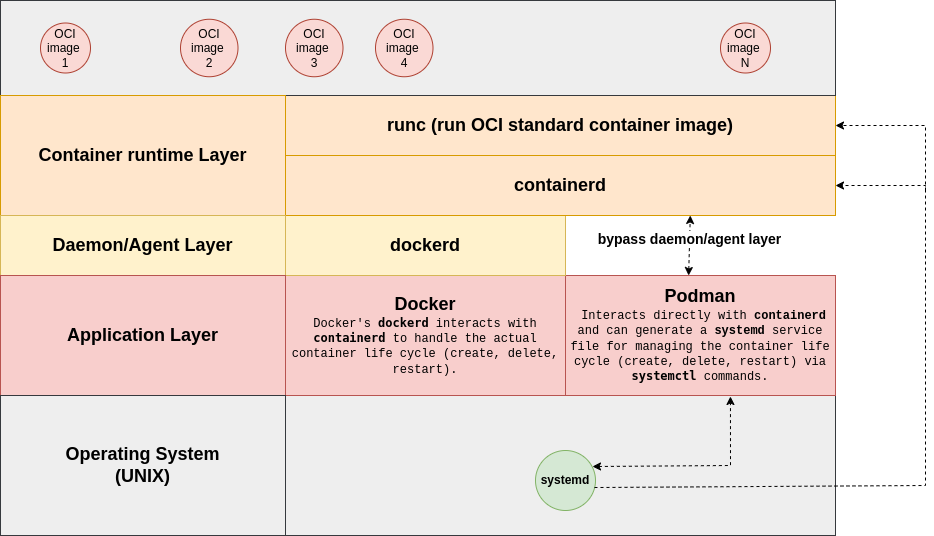
If you look at the diagram above, you’ll see how Podman differs from Docker. Docker relies on an agent/daemon called dockerd, which uses containerd to manage containers. In Docker Swarm mode, dockerd functions as the agent responsible for persisting the declarative state defined by the centralized Docker Swarm instance through commands like:
docker service scale my-service=5
In standalone mode, dockerd is responsible for executing Docker commands such as docker run, docker pull, and docker build.
Podman integrates with containerd, allowing it to execute any Docker command that manages the lifecycle of containers. For example, instead of using docker run, docker pull, and docker build, you can use podman run, podman pull, and podman build.
Therefore, any existing standalone Docker user can easily switch to Podman without much adjustment.
For cluster deployments, Podman uses a concept called POD. A POD is a logical grouping of one or more containers that share resources like CPU, networking, and storage. You can read more about PODs here.
However, unlike Docker, to run PODs, you don’t need to rely on any agent/daemon like dockerd, which Docker requires. This is what makes Podman daemonless.
Podman leverages the underlying operating system, allowing the OS kernel to manage operations related to POD resource allocation and life-cycle (e.g., starting, stopping, and restarting the containers within a POD). To manage resources, you’ll notice the --cgroup-parent flag in the Podman documentation. This refers to the cgroup of the operating system, which is used for resource provisioning. Each cgroup (control group) corresponds to a POD in the underlying operating system, and Podman interacts with the OS to manage the lifecycle and resource allocation of containers. When you use Podman to define a POD, it tells the operating system how to allocate resources such as vCPUs or memory.
The operating system then creates a cgroup that enforces these resource limits. Podman is responsible for managing the containers within the pod, ensuring they run with the allocated resources defined by the cgroup. For example, when you set resource limits for a pod, Podman ensures those limits are translated into the appropriate cgroup, and the OS kernel handles resource allocation and enforcement.
Managing the container lifecycle using the operating system requires some special handling, and Podman takes care of this for you. The podman generate command allows any container image to be treated as a service in systemd. Once created, you can use systemctl commands to manage the container lifecycle, such as:
Podman and systemd Integration:
Podman can manage containers with systemd unit files, enabling the orchestration of containers in a daemonless manner. Here’s how it works:
- Create a systemd service for a Podman container: You can use the
podman generate systemdcommand to create a systemd service file for a container, allowing you to control the container lifecycle (create, delete, restart) usingsystemctlcommands:podman generate systemd --name oci_image_1 > /etc/systemd/system/oci_image_1.service
- Manage container lifecycle with
systemctl: Once the systemd service is created, you can start, stop, and restart the container just like any other system service:systemctl startoci_image_1systemctl stopoci_image_1
This flexibility and integration with systemd give Podman a distinct advantage in container orchestration compared to Docker. While Docker has a longer history, Podman provides more granular, flexible container management, which has earned it a growing fanbase among developers who prefer daemon-less container orchestration.
Docker or Podman
Personally, I prefer Podman because it offers Docker command compatibility (although not all Docker commands are supported by dockerd). It’s daemonless, meaning I don’t need to worry about an agent running on every physical node.
However, if you’re working in an enterprise environment that depends on Docker’s mature ecosystem and orchestration tools, Docker might be the better choice. As shown in the diagram, Podman can’t fully replicate all the functionalities provided by dockerd—it only supports the features available through containerd. Additionally, Docker Swarm is more mature than Podman in terms of both developer adoption and time on the market. Docker also offers a broader set of tools, including graphical user interfaces (GUIs) and development environments like Docker Desktop, which simplify container setup and management. Podman lacks some of these user-friendly tools.
 joyantablog
One thought on “Docker or Podman, whichever fits for your use case”